
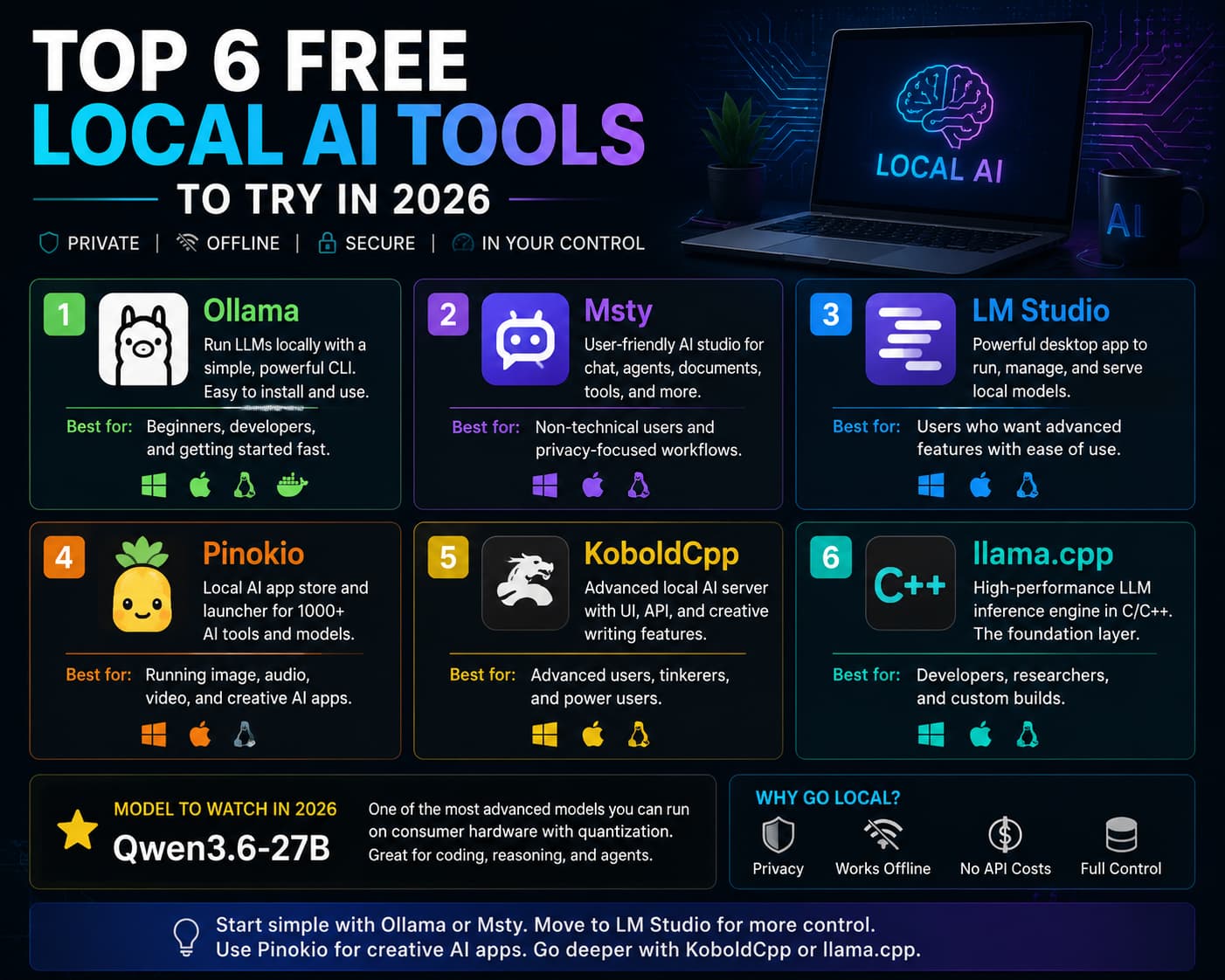
Local AI has moved from hobbyist experiment to practical business tool. Instead of sending every prompt, document, or code snippet to a cloud API, local AI tools let you run models on your own computer, workstation, or server. That can help with privacy, offline access, testing, and cost control.
Here are six of the best free local AI tools to consider right now, based on ease of use, flexibility, and the type of user each one serves best.
1. Ollama
Ollama is the best starting point for most people. It is simple, fast to install, and built around a clean command-line workflow. The official quickstart includes downloads for macOS and Windows, a Linux install command, Docker support, a model library, a REST API, and simple commands like ollama run llama3.2 to start chatting locally. (Ollama)
For businesses, Ollama is ideal when the goal is “get a local model running today.” It works well for developers, IT teams, and technically comfortable users who want a dependable local AI backend without a complicated setup.
2. Msty
Msty is one of the most user-friendly local AI apps available. Msty Studio is a privacy-first AI platform for running local and online AI models from desktop and web, and its free desktop plan includes core features like local and online model chat, knowledge stacks, agent mode, personas, prompt tools, media tools, and more. (Msty Studio)
This makes Msty a strong option for non-technical users who want a polished AI workspace instead of a terminal. It is also useful for teams that want local AI with an organized interface for chats, documents, personas, and workflows.
3. LM Studio
LM Studio sits in the sweet spot between beginner-friendly and advanced. Its documentation says it can download and run local models such as Llama and Qwen, provide a flexible chat interface, search and download models from Hugging Face, serve models through OpenAI-like local endpoints, manage prompts and configurations, and run on macOS, Windows, and Linux. LM Studio also states that it is free to use at home and at work. (LM Studio)
That makes LM Studio a great choice for users who want a polished desktop app but still need developer features. It is easier than building directly on llama.cpp, but more configurable than many basic chat apps.
4. Pinokio
Pinokio is different because it is not just for text chat. It is a local AI app launcher that helps install, run, and automate open-source AI apps. The project describes it as a one-click launcher for open-source projects and a user-friendly interface for scripts that can run commands, download files, and execute local workflows. (Pinokio)
That makes Pinokio especially useful for image generation, audio generation, video tools, voice apps, and other AI projects that normally require manual setup. The tradeoff is that scripts can execute commands, so users should stick to trusted sources and review what they install.
5. KoboldCpp
KoboldCpp is a better fit for advanced users, especially people interested in creative writing, experimentation, and local model serving. The KoboldAI documentation describes KoboldCpp as AI server software for GGML and GGUF models that builds on llama.cpp and adds a KoboldAI API endpoint. It can run text generation, image generation, text-to-speech, and speech-to-text locally, with options for LoRAs, multimodal projectors, and detailed configuration. (KoboldAI)
It is easier than raw llama.cpp in some cases, but still more technical than Ollama, Msty, or LM Studio.
6. llama.cpp
llama.cpp is the advanced foundation layer behind a lot of local AI progress. The project describes itself as LLM inference in C/C++, with the goal of enabling inference with minimal setup and strong performance across a wide range of hardware. It supports quantization, Apple Silicon, x86 acceleration, CUDA, HIP, Vulkan, SYCL, and CPU plus GPU hybrid inference for models larger than available VRAM. (llama.cpp)
For most users, llama.cpp is not the easiest option. For developers, researchers, and infrastructure teams, it is one of the most important local AI projects available.
Model to watch: Qwen3.6-27B
As of May 2026, Qwen3.6-27B is one of the most advanced models serious local AI users can realistically consider for consumer-class hardware, especially with quantization. Alibaba describes it as an open-weight, dense 27-billion-parameter multimodal model with strong agentic coding performance, and Ollama lists qwen3.6:27b as a runnable model. (Qwen3.6-27B)
For most companies, start with Ollama or Msty, move to LM Studio when you need more control, use Pinokio for creative AI apps, and reserve KoboldCpp or llama.cpp for advanced use cases. Local AI is powerful, but it still needs security basics: trusted model sources, patched software, access controls, and clear rules for sensitive company data.
Illini Tech Services can help businesses evaluate secure, practical AI workflows for local and private use. Contact our team at [email protected].