
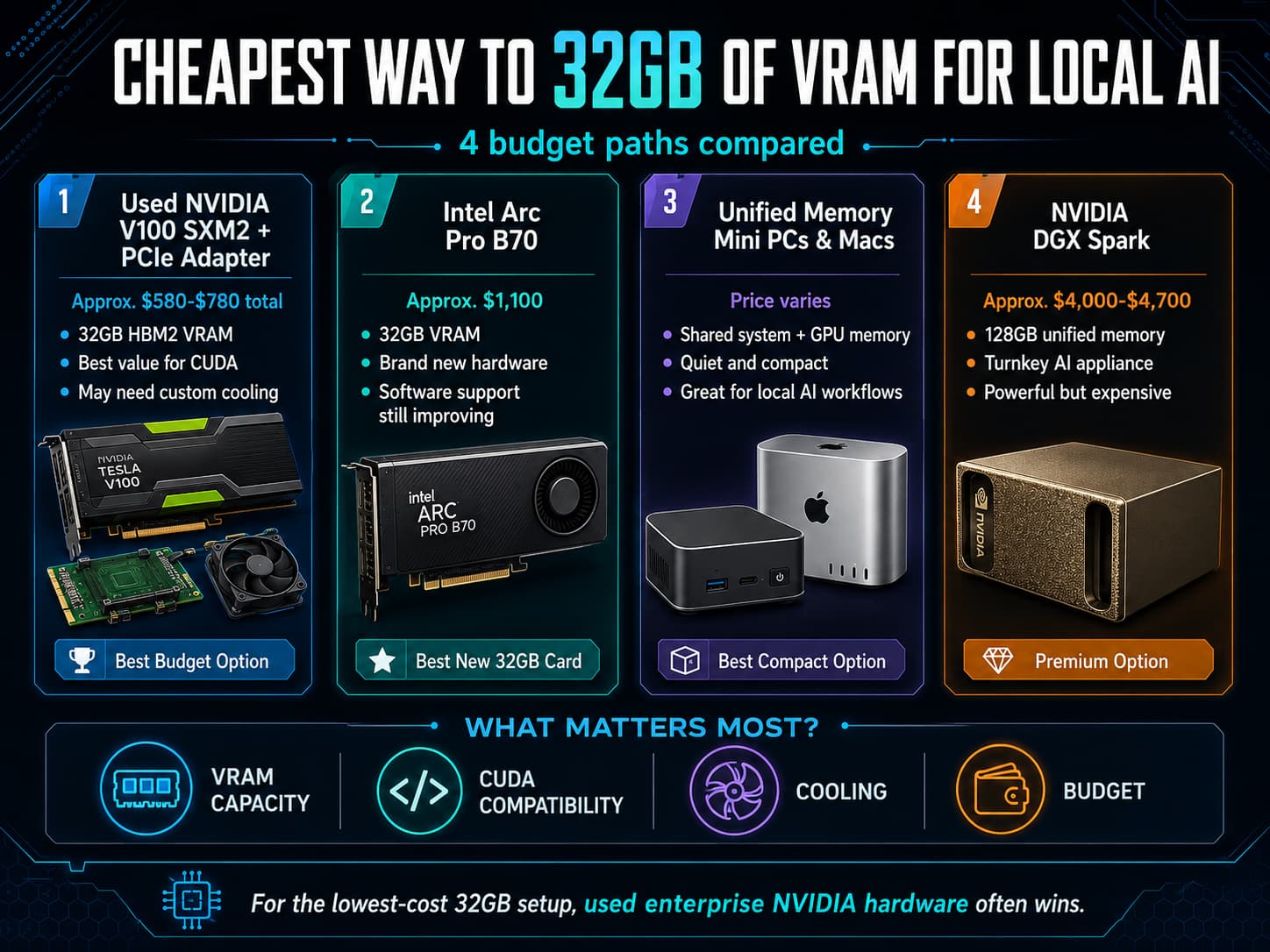
Running AI locally is usually limited by memory before raw speed. A fast GPU with too little VRAM may run small models quickly, but it cannot load larger models without heavy quantization, CPU offloading, or slowdowns. That is why 32GB of VRAM has become a practical target for local AI builders who want to run larger LLMs, image models, embeddings, or several smaller models at once.
The challenge is price. At the time of writing in May 2026, brand-new NVIDIA 32GB GPUs are still expensive. Best Buy listings for RTX 5090 32GB cards show several models above $3,000, including cards listed around $3,109, $3,599, $3,799, and more.
Option 1: Used NVIDIA V100 SXM2 32GB With a PCIe Adapter
The cheapest true 32GB VRAM path is usually a used NVIDIA Tesla V100 SXM2 32GB paired with an SXM2-to-PCIe adapter. The V100 is an older enterprise data center GPU based on NVIDIA Volta. NVIDIA lists the V100 in 16GB and 32GB configurations, with HBM2 memory, 900GB/s memory bandwidth, and 640 Tensor Cores.
This is attractive because it is still an NVIDIA CUDA GPU. Ollama’s hardware support documentation lists the V100 under NVIDIA compute capability 7.0, so many local AI tools can use it through the familiar NVIDIA stack.
The tradeoff is that this is a DIY route. Current eBay listings show used V100 SXM2 32GB cards around $499 to $600, with SXM2-to-PCIe adapters often listed from roughly $56 to $96. You may also need a heatsink, fan shroud, 3D-printed mount, or 60mm to 80mm fans. Watch temperatures carefully because these cards were designed for high-airflow servers.
Best for: tinkerers who want the lowest cost per GB of NVIDIA VRAM and can solve power, cooling, and driver issues.
Option 2: Intel Arc Pro B70
The Intel Arc Pro B70 is the cleaner new-hardware alternative. Intel’s datasheet lists 32GB of VRAM, 608GB/s memory bandwidth, 256 XMX AI engines, Windows and Linux support, and scalable multi-GPU Linux support. Retail listings are around $1,100, with Newegg showing the Arc Pro B70 at $1,099.99 and B&H listing it at $1,101.60.
The upside is simple: it is new, standard PCIe hardware with modern outputs and warranty options. The downside is software maturity. NVIDIA CUDA remains the easiest path for many AI tools. Intel support is improving through oneAPI, OpenVINO, Vulkan, and llama.cpp’s SYCL backend, but expect more setup work.
Best for: users who want a new 32GB card and can tolerate some software experimentation.
Option 3: Unified Memory Mini PCs and Macs
Another route is to stop thinking only in terms of dedicated VRAM. Apple Silicon Macs and AMD Ryzen AI Max systems use unified memory, where system memory can be shared with the GPU. This is not identical to 32GB of discrete VRAM, but it can help run larger local models in compact, quiet systems.
Apple’s current Mac mini specs show M4 Pro options with up to 48GB of unified memory. AMD says the Ryzen AI Max+ 395 can ship with 32GB to 128GB of unified memory, with up to 96GB convertible to VRAM through AMD Variable Graphics Memory.
These systems are appealing for Ollama, LM Studio, llama.cpp, and developer workflows. They can be expensive once configured with enough memory, but they are easier to live with than a modified server GPU.
Best for: quiet workstations, developers, and users who want large memory capacity without building a custom GPU rig.
Option 4: NVIDIA DGX Spark
The NVIDIA DGX Spark is not the cheapest option, but it is the most purpose-built. NVIDIA lists the DGX Spark with a GB10 Grace Blackwell Superchip, up to 1 petaFLOP of FP4 AI performance, 128GB of coherent unified memory, 273GB/s memory bandwidth, and DGX OS. NVIDIA’s forum says the Founders Edition MSRP increased from $3,999 to $4,699 due to memory supply constraints, and Amazon listings show $4,699.
Best for: businesses, researchers, and developers who want a supported NVIDIA local AI appliance instead of a DIY workstation.
Final recommendation
For the absolute cheapest way to get 32GB of NVIDIA VRAM, the used V100 SXM2 plus PCIe adapter route is the winner. For the best new dedicated 32GB GPU below high-end NVIDIA pricing, look at the Intel Arc Pro B70. For compact local AI, compare Ryzen AI Max+ 395 mini PCs and Apple unified-memory systems. For a premium turnkey box, DGX Spark is compelling but expensive.
Illini Tech Services can help businesses evaluate local AI hardware, private AI workflows, and secure deployment options. Contact our team at [email protected].